
CLAUSEDOCK GUIDES
Duplicate 3PL Charges: How to Find and Verify Them
Two charges appear against the same order. The amounts match, your spreadsheet flags both rows, and the total looks like an overcharge.
Duplicates are among the 3PL billing errors that are easiest to flag and easiest to misjudge. The rows might represent the same transaction exported twice, two separate shipments, or a charge that was reversed and reissued.
To verify a suspected duplicate, connect each charge to a transaction, a service event, and the applicable billing rule.
ClauseDock’s review approach starts with that evidence. A flag opens an investigation; the supporting records determine the finding.
For a complete fulfillment billing audit, start with how to audit a 3PL invoice.
What Counts as Duplicate 3PL Charges?
Duplicate 3PL charges occur when the same billable service is charged more times than the agreement and activity records support, after related adjustments.
Duplicate fulfillment charges often surface as rows sharing a service reference and an amount. Matching values give you a useful starting point, but they do not establish whether the provider billed the same service twice.
Separate these three situations:
| Situation | What it means | Next step |
|---|---|---|
| One transaction appears in multiple exports | Your combined dataset repeats a source record | Reconcile the exports and retain one analytical copy |
| Separate charges cover separate services | Similar-looking rows may both be valid | Verify the activity and billing terms |
| Separate charges appear to cover the same service | A possible billing discrepancy | Check fee scope, credits, and the expected amount |
The following examples use fictional records and amounts to illustrate the method.
1. Preserve the Original Billing Detail
Keep the original invoice, billing export, effective agreement or rate card, and the activity records supporting the billed services.
Work from a separate review copy. Record each export’s date range, filters, and download date so you can explain where the rows came from.
Useful fields include:
- Provider, account, and invoice number.
- Transaction ID and fee description.
- Order, shipment, receiving, return, or work reference.
- Service date and posting date.
- Facility, quantity, unit, amount, and currency.
- Transaction type and any linked adjustment reference.
ShipBob’s billing documentation, for example, describes transaction IDs, service references, amounts, currencies, and transaction types. These fields help distinguish a billing record from the activity it concerns.
Preserve identifiers as text. A spreadsheet that removes leading zeros or changes a long reference can break the connection to the original record.
2. Rule Out Repeated Export Rows and Check Adjacent Invoices
Before investigating overbilling, check whether your own review file repeats transactions.
Common causes include combining:
- An invoice export with a monthly account export.
- Downloads covering overlapping date ranges.
- Multiple copies of the same report.
- Summary records with their underlying detail.
- Export pages with overlapping rows.
Consider this example:
| Source | Transaction | Shipment | Amount |
|---|---|---|---|
| Invoice export | TX-104 | SH-880 | $12.50 |
| Monthly account export | TX-104 | SH-880 | $12.50 |
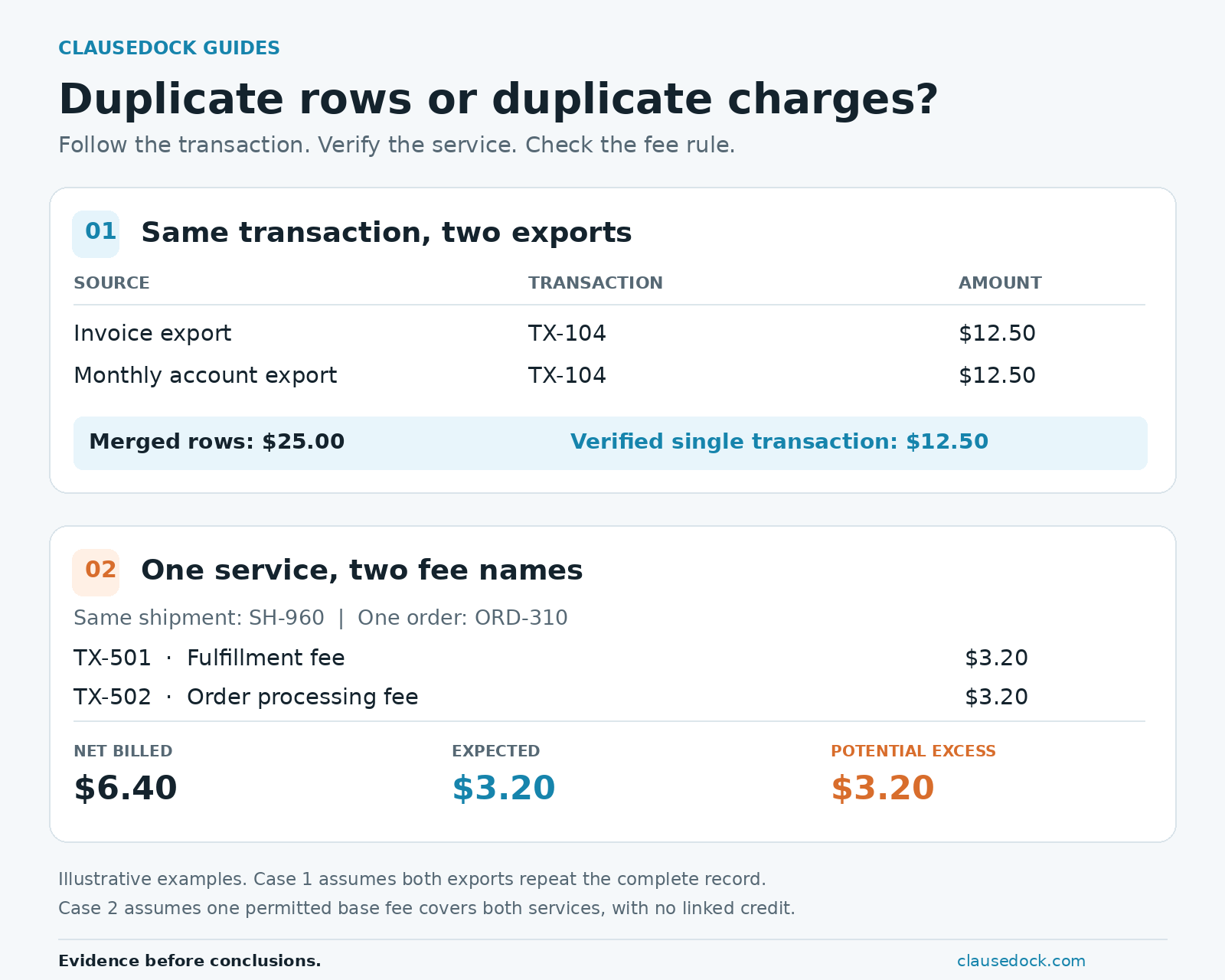
The merged spreadsheet shows $25.00. If both rows are copies of the same $12.50 transaction, the extra $12.50 exists in your dataset rather than in the provider’s bill.
Verify the complete record before removing an analytical duplicate. A transaction ID alone may be insufficient when an export splits one transaction into multiple fee components.
Retain the original files and record why you excluded a repeated row.
Check for the Same Service on Consecutive Invoices
A service performed near a billing-period boundary can also appear on two consecutive invoices.
Compare the service reference, service date, transaction IDs, and adjustment history against the previous invoice. Determine whether the second appearance is a repeated export record, a new billing transaction, or a correction.
Distinct transactions on separate invoices deserve investigation when both appear to bill the same service. Do not discard them as a download overlap without checking the invoice detail.
Run a Quick CSV Check
Checking for export overlap by hand? ClauseDock’s free checker finds repeated complete rows in a CSV after normalizing whitespace and letter case.
It runs locally in your browser; your file is not uploaded. Treat its results as leads to investigate.
The checker compares rows. It does not determine whether a fee is permitted by your contract or whether two different rows cover the same service.
3. Group Similar Charges and Flag Candidates in a Spreadsheet
Start by grouping charges using:
Account + service reference + fee category + service date + facility + currency
Then compare quantities, units, and amounts within each group.
The right reference depends on the service:
| Fee family | References to compare |
|---|---|
| Shipping | Shipment or package, service, and charge component |
| Receiving | Inbound receipt, task, and billed unit |
| Returns | Return reference and processing event |
| Storage | Facility, location or storage unit, and billed period |
| Special work | Work request, task, and completion record |
Duplicate warehouse charges such as storage and receiving need a billed period or inbound reference in the comparison. Two storage rows for different periods can look identical while covering separate activity. Check how storage fees are calculated before comparing their billed quantities.
Keep original fee descriptions alongside any normalized categories. Also review each service reference across fee categories: a duplicate can hide behind a different description.
A Simple Spreadsheet Formula
For a review sheet containing one account, one facility, and one currency, use:
| Column | Field |
|---|---|
| A | Service reference |
| B | Fee description |
| C | Service date |
| D | Amount |
| E | Matching-row count |
With headers in row 1 and data through row 10000, enter this in E2 and fill down:
=IF(A2="","",COUNTIFS($A$2:$A$10000,A2,$B$2:$B$10000,B2,$C$2:$C$10000,C2,$D$2:$D$10000,D2))COUNTIFS is available in Excel and Google Sheets. Adjust the last row to cover your dataset. Values above 1 flag candidates sharing those four fields.
If your file spans multiple accounts, facilities, or currencies, add those fields to the matching criteria or review each scope separately.
For numeric-only service references, especially those with leading zeros or more than 15 digits, preserve column A as text when importing the original file. Use this direct-comparison version to distinguish the stored reference values:
=IF(A2="","",SUMPRODUCT(($A$2:$A$10000=A2)*($B$2:$B$10000=B2)*($C$2:$C$10000=C2)*($D$2:$D$10000=D2)))This version can be slower on large sheets. Keep all ranges the same size and limit them to the rows you need.
Neither formula can restore digits or leading zeros already lost during import. If references have changed, reimport them from the original source as text before comparing rows.
Keep dates and amounts in consistent formats. Both formulas flag matching fields; they do not compare transaction IDs or read fee terms. They also miss charges using different fee descriptions, which need the broader service-reference review below.
4. Verify Separate Activity and Overlapping Fee Names
An order reference alone is often too broad for duplicate detection.
ShipBob’s orders integration guide explains that one order can have multiple shipments—for example, when inventory sits in multiple fulfillment centers or the items do not fit in one box.
Example: One Order, Two Shipments
| Order | Transaction | Shipment | Charge |
|---|---|---|---|
| ORD-220 | TX-201 | SH-901 | $18.00 |
| ORD-220 | TX-202 | SH-902 | $18.00 |
Both rows concern the same order and have the same amount. Two documented shipments may support both charges if the agreement permits the applicable fee per shipment.
Check the shipment records and billing unit before deciding.
Other explanations can include replacement shipments, separate receiving tasks, a return label plus return processing, or a later carrier adjustment. Each explanation still needs supporting activity and terms.
Example: One Activity, Two Fee Names
Order ORD-310 has one shipment, SH-960. Its billing detail shows:
| Transaction | Shipment | Fee description | Charge |
|---|---|---|---|
| TX-501 | SH-960 | Fulfillment fee | $3.20 |
| TX-502 | SH-960 | Order processing fee | $3.20 |
The applicable rate card defines a $3.20 base fee per order covering picking, packing, and order processing. The activity records support one order, and no separate permitted processing fee or linked credit is documented.
- Net billed: $6.40.
- Supported expected charge: $3.20.
- Potential excess: $3.20.
A match requiring identical fee descriptions would miss this group.
Review all charges connected to the service reference, then read what each fee covers. If the agreement permits separate fees, both may be valid. If the fee scope is unclear, mark the group Needs review and request clarification.
For included picks, packaging, rate changes, tiers, and minimums, see our guide to 3PL fulfillment fees.
5. Reconcile Credits, Reversals, and Reissued Charges
This is the 3PL invoice reconciliation step of the review: determine what remains billed after related corrections.
A correction can create several similar transactions:
| Transaction | Role | Signed amount |
|---|---|---|
| TX-301 | Original charge | $18.00 |
| TX-302 | Linked reversal | −$18.00 |
| TX-303 | Reissued charge | $18.00 |
Adding only the positive rows produces $36.00. Including the linked reversal gives a net charge of $18.00.
Check how the export represents adjustments. Some reports use signed amounts; others use transaction types with positive amounts. Interpret the convention before calculating a net value.
A credit must be linked to the service or disputed charge before you offset it. A payment settling an invoice does not reduce the underlying service charge.
Check later billing periods when corrections may post after the original invoice.
6. Calculate Potential Excess Once per Group
Once the activity and rate are supported, calculate:
Potential excess = net billed amount − supported expected amount
Suppose the agreement permits one $12.50 charge per documented event. The activity records support one event for SH-950, and the reviewed adjustment records contain no related credit.
| Transaction | Service reference | Charge |
|---|---|---|
| TX-401 | SH-950 | $12.50 |
| TX-402 | SH-950 | $12.50 |
| TX-403 | SH-950 | $12.50 |
The calculation is:
- Net billed: 3 × $12.50 = $37.50.
- Supported expected amount: 1 × $12.50 = $12.50.
- Potential excess: $37.50 − $12.50 = $25.00.
The potential excess is $25.00, because one charge is supported.
Avoid the Pairwise-Count Trap
Three similar rows generate three comparison pairs:
- TX-401 against TX-402.
- TX-401 against TX-403.
- TX-402 against TX-403.
These pairs describe one review group. Summing a discrepancy for every pair would count some transactions more than once.
Assign one group ID, reconcile its distinct transactions, and calculate its potential excess once.
When the activity, fee scope, or adjustment history is incomplete, leave the expected amount unresolved.
7. Keep an Evidence-Based Review Worksheet
Maintain one worksheet entry per review group.
| Field | What to record |
|---|---|
| Group ID | A unique review reference |
| Scope | Provider, account, invoices, and periods |
| Service references | Shipment, receipt, return, storage period, or task |
| Billing records | Distinct transaction IDs and original source rows |
| Billing basis | Quantity, unit, rate, currency, and applicable term |
| Gross charges | Relevant charges before linked adjustments |
| Linked adjustments | Credits or reversals with supporting references |
| Net billed | Charges after related adjustments |
| Expected amount | Amount supported by terms and activity |
| Potential excess | Difference, when the expected amount is supported |
| Evidence status | Supported discrepancy, Needs review, or Resolved |
| Next action | Owner, question, deadline, or correction follow-up |
Record what is missing when you cannot establish the expected amount. An unknown rate or quantity is not zero.
The self-service ClauseDock workspace is in release testing. Customer uploads and checkout are not open.
Reviews are not open for file submission yet. Start by describing your records without attaching invoices, contracts, or customer files. We will confirm what can be scoped today. Availability and price must be confirmed before an order.
8. Send a Specific Correction Request
For the full 3PL invoice dispute email, evidence packet, and credit follow-up, see our correction guide.
A useful request identifies the transactions, explains the supported billing basis, and asks the provider to resolve the difference.
Follow the agreement’s notice procedure, deadline, and designated channel.
Copyable Correction Request
Subject: Review request — repeated [service] charges on invoice [number]

Hello [provider team],

Please review the following billing group:

Account: [account reference]
Invoice(s): [invoice numbers]
Service reference: [shipment, receipt, return, or work reference]
Service date or period: [date or period]
Transaction IDs: [IDs]
Net billed after linked adjustments: [amount and currency]

Our available activity records support [quantity and service].
The applicable term is [clause or rate-card reference and effective date].

Supported expected amount:
[quantity] × [rate] = [amount]

Potential difference:
[net billed] − [expected amount] = [amount]

Please confirm whether the transactions represent separate billable
activity or another applicable fee rule. If they cover the same service
beyond the permitted charge, please issue the appropriate correction
and provide its reference.

We have retained the original billing detail, applicable terms, and
activity records. Please confirm the agreed secure channel for sharing
the supporting documents.

Thank you,
[name and role]
If a required record is missing, state that clearly and ask for the explanation needed to complete the review.
9. Track the Outcome Through the Account
Keep these stages separate:
- Candidate: a group has been flagged.
- Requested: clarification or correction has been requested.
- Accepted: the provider agrees a correction is due.
- Posted: the credit or adjustment appears in billing records.
- Refunded: funds are returned, where applicable.
Close a group as Resolved when the evidence explains valid charges or a correction is reconciled. Record the explanation, transaction references, and dates; an accepted request still needs follow-up until the correction posts. See the broader guide for how to track the outcome through the account.
Duplicate-Charge Review Checklist
Download the printable checklist
Frequently Asked Questions
Do two identical amounts prove duplicate 3PL charges?
No. Equal amounts can cover separate services. Compare transaction IDs, service references, activity records, fee terms, and related adjustments.
Can one order legitimately have multiple fulfillment charges?
Yes, depending on the agreement and activity. An order may have multiple shipments or separately billable services. Check whether the fee applies per order, shipment, unit, or task.
Should I remove rows with the same transaction ID?
First verify what the export row represents. Multiple rows may describe components of one transaction. Exclude analytical copies only after confirming that they repeat the same source record.
Can I investigate without a rate card?
You can identify repeated records and request an explanation. Establishing a contractual excess generally requires the effective terms and the activity supporting the expected charge.
What does ClauseDock’s free checker verify?
The free CSV checker identifies repeated complete rows after normalizing whitespace and letter case. It runs in your browser without uploading the file.
It does not verify contractual overbilling, compare rates, or identify every duplicate pattern—such as one service billed under different fee names.
Turn a Flag Into a Verifiable Finding
A useful review of duplicate 3PL charges connects the billing transaction, the service performed, and the applicable fee rule.
Start with export overlap, verify the activity and fee scope, reconcile adjustments, and calculate the difference once per group. That gives the provider a specific question to answer and gives your team a finding it can explain.
Open the free CSV checker for exact repeated rows. It does not compare rates or perform an invoice audit.
Review availability and price are confirmed before an order. Describe the records you have without emailing invoice, contract, or customer files.
Guides in This Series
- How to Audit a 3PL Invoice: A Practical Checklist
- Duplicate 3PL Charges: How to Find and Verify Them
- How to Calculate 3PL Storage Fees and Check Your Invoice
- How to Dispute a 3PL Invoice With Clear Evidence
- 3PL Fulfillment Fees: How to Check Your Invoice
- 3PL Receiving Fees: How to Check Your Invoice