
CLAUSEDOCK GUIDES
3PL Fulfillment Fees: How to Check Your Invoice

Checking 3PL fulfillment fees means connecting each billed service to the rate card and the activity that supports it.
A line labeled “fulfillment” might cover an order, a shipment, the first item, additional items, or a bundle of services. Multiplying the invoice quantity by a familiar rate will not establish whether the charge is correct unless those definitions match.
A useful fulfillment invoice audit answers four questions:
- What event triggered the fee?
- What unit does the agreement charge for?
- Which rate applied to that event?
- What operating record supports the billed quantity?
This guide explains how to check included picks, additional-item charges, packaging, rate changes, pricing tiers, and monthly minimums. It also shows how to document a difference without treating an incomplete calculation as a confirmed billing error.
All worked examples, rates, references, and amounts below are fictional. They illustrate review methods, not market prices, customer results, or verified provider errors.
What Are 3PL Fulfillment Fees?
3PL fulfillment fees are charges a third-party logistics provider bills for processing outbound orders. Depending on the agreement, they may include a base fee per order or shipment, additional-item picking charges, packing labor, and packaging materials.
Storage, receiving, returns, and carrier shipping are separate fee families unless your agreement bundles them.
The same service can be described as fulfillment, handling, or pick and pack. Match the definition and billable unit rather than relying on the fee’s name.
This guide focuses on checking your invoice against your agreed pricing. It does not provide market price ranges or establish what another provider should charge.
The Review Process at a Glance
- Define which charges you are reviewing.
- Match each fee to its contract rate-card row.
- Verify the billable activity and included allowances.
- Recalculate the applicable fulfillment fees.
- Check tiers, minimums, and exceptions.
- Build a reconciliation with source references.
- Request a specific explanation or correction.
- Check whether the same issue returns next month.
1. Define the Scope of Your Fulfillment Review
Start by separating outbound fulfillment charges from other cost categories.
Your invoice may combine pick-and-pack fees, packaging materials, storage, receiving, shipping labels, returns, and special projects. Those categories require different evidence.
| Fee Family | Possible Billing Unit | Supporting Record |
|---|---|---|
| Base fulfillment | Order or shipment | Completed order or shipment activity |
| Additional-item picking | Eligible item, unit, or pick | Item-level activity and allowance rules |
| Packaging material | Box, mailer, or insert | Material usage record |
| Special handling | Event, item, or labor time | Work order and activity record |
| Storage | Location, pallet, volume, or time | Inventory and storage records |
| Carrier shipping | Parcel, weight, zone, service | Shipment and carrier billing detail |
These are possible units, not universal definitions.
For this guide, the main scope is outbound fulfillment labor and related packaging. Storage and carrier transportation should remain separate unless your agreement bundles them into one charge.
For inbound inventory processing, see 3PL Receiving Fees: How to Check Your Invoice.
Provider pricing models differ. ShipBob’s pricing page describes customized fulfillment quotes. Fulfillment.com describes pricing modeled on client volume and SKU profile and contracted upfront.
Public descriptions explain possible structures; your applicable agreement establishes the rate to check.
Compare like with like: a labor-only invoice line against a labor-only estimate, using matching services and quantities.
If the provider bills a combined amount, request the breakdown or documented combined pricing rule needed to reproduce it.
For storage charges, use How to Calculate 3PL Storage Fees.
2. Match Each Fee to the Applicable Rate-Card Row
A contract rate card is more than a list of prices. It defines when a price applies and what it includes.
For every fee family, record the matching terms:
| Rate-Card Detail | Question to Answer |
|---|---|
| Service | Does this row describe the billed work? |
| Billable unit | Is the rate per order, shipment, item, case, or another unit? |
| Included allowance | What work or materials are already covered? |
| Warehouse | Does the rate apply at this facility? |
| Channel | Is it for DTC, wholesale, marketplace, or another flow? |
| Effective date | Which event determines the rate version? |
| Volume rule | Is pricing flat, tiered, or subject to a minimum? |
| Exceptions | Which activities require separate charges? |
| Currency and tax | Are the compared amounts on the same basis? |
Keep a reference to the source document, page or section, and effective date.
A row labeled “first item” is not automatically interchangeable with “order fee.” A case pick is not automatically equivalent to picking each unit inside the case.
If the agreement is ambiguous, record the issue as Needs review and request the definition. Wait for that definition before choosing a calculation.
Verify Packaging Inclusions Separately
Standard supplies, branded materials, and labor for inserting those materials may receive different treatment.
For example, ShipBob’s pricing page discusses standard packing supplies, while ShipMonk’s pricing page states that custom packaging is billed as an additional item during pick-and-pack.
These examples show why packaging treatment must be matched to the provider and account terms.
A merchant-owned box may have no provider material-purchase charge while still generating permitted storage or handling charges.
Identify the exact material and service before challenging the line.
3. Verify the Activity and Included Allowances
The quantity in your sales platform may not be the quantity your agreement bills.
An order can split into multiple shipments. A canceled order may have reached a billable work stage. A bundle may be picked as a prepared kit or as individual components.
Build the review around the event defined in the agreement.
Keep the Identifiers Connected
Useful fields include:
- Invoice and transaction reference.
- Order ID and shipment ID.
- Warehouse.
- Service date or billing-trigger date.
- SKU and processed quantity.
- Material or special-service reference.
- Activity status.
- Rate-card version.
Preserve identifiers as text when importing exports. Leading zeros and long references can be damaged by spreadsheet conversion.
Check that the export includes the complete period and all relevant records. Save the filters used, including warehouse, channel, status, and date basis.
Remove Export Overlap Before Counting Activity
If two exports overlap, the same activity may appear twice in your review file.
ClauseDock’s free CSV checker identifies repeated complete rows after normalizing whitespace and letter case. It runs in your browser without uploading the file.
Use it as a first pass when checking merged exports. It does not calculate additional-item pick fees or determine whether different records describe one billable service.
Keep original exports intact. Resolve repeated records using their identifiers and source coverage before building totals.
For more detail, see Duplicate 3PL Charges.
Apply Allowances at the Level Defined by the Contract
If an agreement includes two items per order, apply the allowance separately to each eligible order.
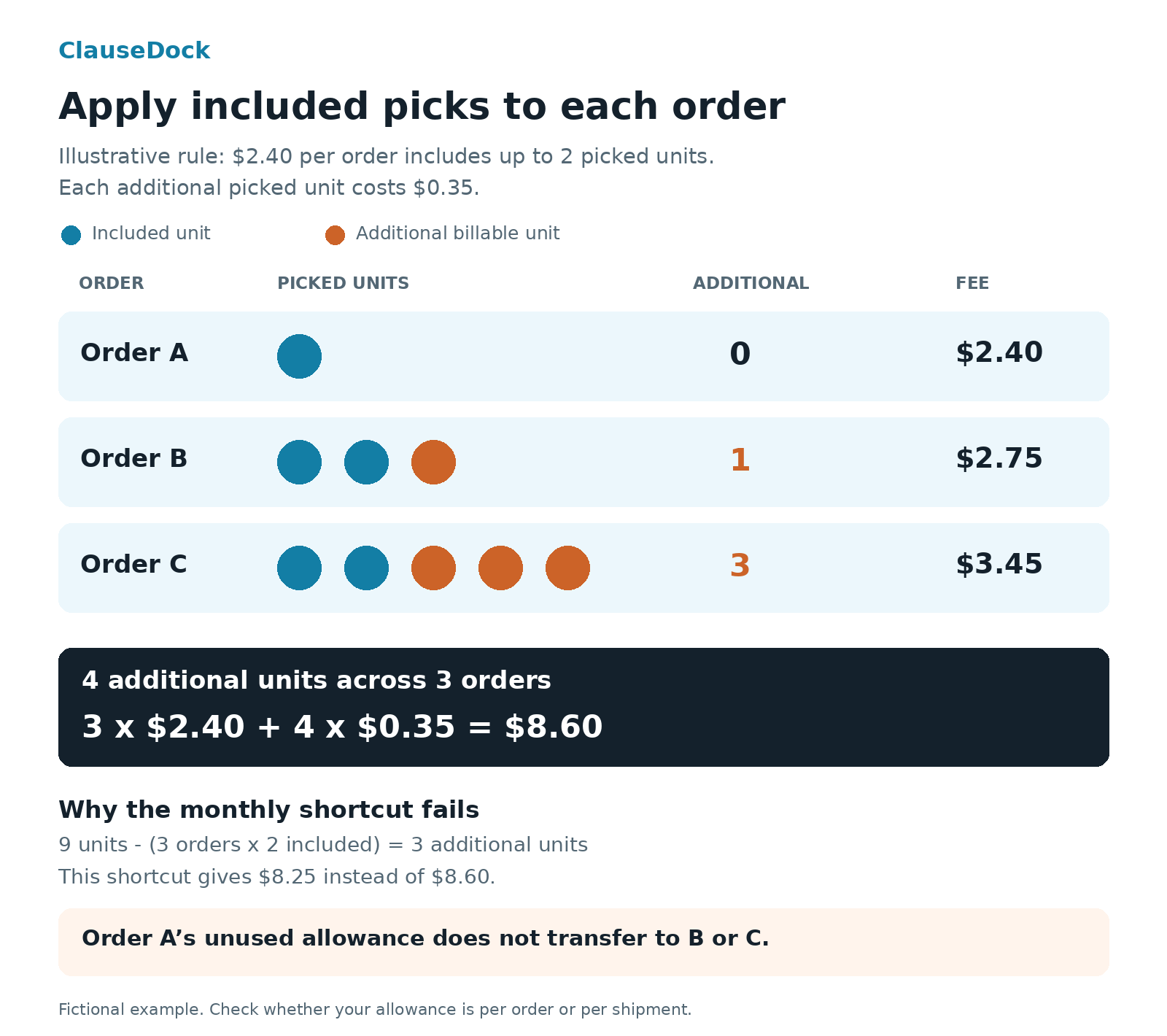
Do not subtract two times the number of orders from the monthly item total. Unused allowances on a small order do not necessarily transfer to a larger order.
If the allowance is per shipment instead, use shipments. That distinction can materially change the calculation.
4. Recalculate 3PL Fulfillment Fees With Worked Examples
Start with the simplest fee family whose terms and activity you can establish.
Keep separate calculations for different warehouses, channels, rate versions, and service definitions.
Example A: Included Picks Must Be Applied Per Order
Assume the agreement states:
- Base fee: $2.40 per completed order.
- Two picked units included per order.
- Additional picked units: $0.35 each.
- No other fee or minimum applies to this example.
The matching activity contains three orders:
| Order | Picked Units | Included Units | Additional Billable Units | Expected Fee |
|---|---|---|---|---|
| A | 1 | Up to 2 | 0 | $2.40 |
| B | 3 | Up to 2 | 1 | $2.75 |
| C | 5 | Up to 2 | 3 | $3.45 |
| Total | 9 | Applied per order | 4 | $8.60 |
For each order:
Additional billable units = MAX(picked units − included allowance, 0)
Expected fee = base fee + additional billable units × additional-unit rate
The combined expected fee is:
3 × $2.40 + 4 × $0.35 = $8.60
The incorrect monthly shortcut would calculate:
MAX(9 units − 3 orders × 2 included units, 0) = 3 additional units
That produces:
$7.20 + 3 × $0.35 = $8.25
The shortcut understates the expected fee by $0.35 because it transfers Order A’s unused allowance to another order.
Now suppose the invoice bills five additional units:
$7.20 + 5 × $0.35 = $8.95
The potential adjustment is:
$8.95 billed − $8.60 expected = $0.35
That difference is supported only if the order-level allowance and activity are established.
Spreadsheet Formulas for the Same Rule
Use one row per billable order:
| Column | Field |
|---|---|
| A | Order ID |
| B | Verified picked units |
| C | Included allowance |
| D | Base fee |
| E | Additional-unit rate |
| F | Expected fee |
In F2:
=D2+MAX(B2-C2,0)*E2Copy the formula down and sum the expected fees.
This expression implements the example’s flat-rate rule. It does not handle tiers, split-shipment policies, special services, or minimums.
If your source contains one row per SKU, first aggregate the verified activity to one row per billable order. Otherwise, you may accidentally charge the base fee once per SKU row.
For the example’s simple order IDs A, B, and C, suppose the Activity sheet contains order IDs in column A and numeric picked units in column C. With the order ID in A2 on your review sheet, enter this in B2:
=SUMIFS(Activity!$C$2:$C$10000,Activity!$A$2:$A$10000,A2)Repeat for each distinct order ID. The aggregated quantities should be 1, 3, and 5, producing $8.60 through the fee formula.
Use activity that has already been checked for duplicates, relevant status, warehouse, and period. Extend both ranges together if the export exceeds row 10,000.
SUMIFS criteria can interpret wildcard characters and number-like identifiers. For IDs containing significant leading zeros, long digit strings, or wildcard characters, use a verified exact-identifier matching method before aggregating. Importing as text preserves the source value but does not by itself guarantee exact SUMIFS matching.
If the spreadsheet uses semicolons as argument separators, replace the commas accordingly.
Example B: A Rate Changes During the Billing Period
Assume an amendment changes the base fulfillment fee from $2.40 to $2.60, effective for eligible orders shipped from October 16.
The activity shows:
- 200 eligible orders shipped before October 16.
- 300 eligible orders shipped from October 16 onward.
| Activity Group | Orders | Applicable Rate | Expected Amount |
|---|---|---|---|
| Before the effective date | 200 | $2.40 | $480.00 |
| From the effective date | 300 | $2.60 | $780.00 |
| Total | 500 | Two rate periods | $1,260.00 |
If all 500 orders were billed at $2.60, the invoice amount would be $1,300.00.
$1,300.00 − $1,260.00 = $40.00 potential adjustment
Use the event specified in the amendment. If pricing changes by order creation date, a shipment-date split would be inappropriate.
Verify the time zone and boundary timestamp when activity falls near the effective date.
Example C: Packaging Quantity Needs Further Evidence
Assume a separately billable standard mailer costs $0.55.
The invoice bills 120 mailers. Available matching packing records show 100. The treatment of waste, replacements, and material inclusions has not yet been confirmed.
| Item | Calculation | Amount |
|---|---|---|
| Billed materials | 120 × $0.55 | $66.00 |
| Materials in available records | 100 × $0.55 | $55.00 |
| Difference to investigate | 20 × $0.55 | $11.00 |
Request the records for replacements, repacking, voided shipments, and recorded waste.
Keep the issue as Needs review until the rule and complete activity establish whether the extra 20 mailers are billable.
If the material is included in the base fee, ask what exception permits a separate material charge.
Settle the inclusion rule first. The $11.00 quantity comparison applies only if the mailer is separately billable under the stated rate.
5. Check Tiers, Minimums, and Exceptions
Flat-rate calculations are useful only when the agreement actually uses a flat rate.
Graduated Tiers and All-Volume Tiers Produce Different Results
Assume 1,200 eligible orders and these stated prices:
- $2.40 for the first 1,000 orders.
- $2.10 above 1,000 orders.
Under a graduated interpretation:
1,000 × $2.40 + 200 × $2.10 = $2,820.00
If the agreement instead applies $2.10 to every eligible order once the threshold is reached:
1,200 × $2.10 = $2,520.00
| Tier Method | Expected Amount |
|---|---|
| Graduated tiers | $2,820.00 |
| All-volume rate after threshold | $2,520.00 |
| Difference between interpretations | $300.00 |
For the graduated rule, with eligible order count in B1:
=MIN(B1,1000)*2.40+MAX(B1-1000,0)*2.10At 1,200 orders, the result is $2,820.00.
The $300.00 difference between interpretations is not automatically an overcharge.
Confirm whether volume is counted by orders or shipments, whether warehouses are combined, and whether the threshold resets monthly.
Keep the issue as Needs review until the pricing tier method is established.
A Monthly Minimum May Be a Floor
Assume the agreement defines a $500 monthly minimum as a floor on eligible fulfillment labor fees.
Verified eligible fees total $420:
Minimum adjustment = MAX($500 − $420, $0) = $80
Total eligible fees after the floor = $420 + $80 = $500
Adding a separate $500 minimum to the $420 would produce $920. That would not match the stated floor rule.
However, a separately contracted reservation or service fee may be additive. Establish the rule before deciding which treatment applies.
Check exactly which fee families count toward the minimum. Shipping, storage, and special projects may have different treatment.
Separate Special Projects From Routine Fulfillment
A kitting, labeling, inspection, or repacking charge needs its own support.
Match the scope, pricing unit, authorization or approval required by the agreement, and completed activity.
ShipMonk’s pricing page describes special projects as tasks outside regular pick-and-pack and explains that project scope and a quote are established before work begins. This is a provider-specific example; verify your own procedure.
A special-project charge is not automatically a duplicate of the base fee. Compare the services performed.
6. Build a Reconciliation Another Reviewer Can Reproduce
Keep the calculation and its sources together.
For the three independent worked examples above:
| Issue | Billed | Expected Under Stated Assumptions | Potential Adjustment | Evidence Status |
|---|---|---|---|---|
| Additional picks | $8.95 | $8.60 | $0.35 | Supported discrepancy |
| Rate effective date | $1,300.00 | $1,260.00 | $40.00 | Supported discrepancy |
| Mailer quantity | $66.00 | $55.00 | $11.00 if confirmed | Needs review |
| Supported total | — | — | $40.35 | — |
The $11.00 mailer difference stays outside the supported total until the waste, replacement, and inclusion rules are confirmed.
For each issue, retain:
- Invoice and transaction references.
- Rate-card section and effective date.
- Activity source and relevant rows.
- Formula and assumptions.
- Evidence status.
- Explanation or requested action.
Use consistent evidence labels:
| Evidence Status | Meaning |
|---|---|
| Supported discrepancy | Available evidence supports a difference under stated assumptions |
| Needs review | Missing or ambiguous evidence prevents a reliable conclusion |
| Resolved | The question has been answered and the outcome recorded |
Record which fee families you checked and which remain outside the reviewed scope. Passing a few calculations does not establish the correctness of the entire invoice.
7. Request a Specific Explanation or Correction
A useful request identifies the fee, the rule, the activity, and the exact difference.
For the rate-change example:
Please review the base fulfillment charges on invoice [number]. The amendment applies $2.60 to eligible orders shipped from October 16. Our matching activity shows 200 orders before that date at $2.40 and 300 afterward at $2.60, producing $1,260.00. The invoice bills $1,300.00. Please confirm the date basis used and issue a $40.00 adjustment if the amendment applies as described.
If evidence is missing, ask for it directly:
Please provide the packing activity supporting the 20 additional mailers and the applicable waste or replacement billing rule.
For a complete email template, evidence packet, deadline checks, and credit follow-up, see How to Dispute a 3PL Invoice With Clear Evidence.
Keep requested, accepted, and posted adjustments separate. A supported discrepancy is not a posted credit, and a posted account credit is not necessarily a cash refund.
8. Check Whether the Issue Returns Next Month
After the question is resolved, record the rule confirmed by the provider.
Update your review model if the explanation establishes a valid allowance, packaging exception, or rate boundary.
If the provider corrected a billing configuration, check the next invoice for the affected fee family.
Track both:
- New discrepancies for the current period.
- Previously accepted adjustments still awaiting posting.
For cost monitoring, compare equivalent order populations. A higher average order fulfillment cost can reflect more units per order, additional packaging, or a different channel mix.
If your metric covers labor and packaging only, label it accordingly:
Reviewed labor and packaging cost per eligible order = scoped charges ÷ eligible order count
Call it labor and packaging cost per order when it excludes transportation, storage, and other cost categories.
Use the same scope and denominator when comparing periods.
Pre-Review Checklist
Frequently Asked Questions
Are Pick and Pack Fees Always Charged Per Order?
No. The applicable schedule may use an order fee, first-item fee, additional-unit charge, shipment fee, or a combined structure. Match the unit before calculating an expected amount.
Should Included Picks Be Subtracted From the Monthly Item Total?
Only if the agreement explicitly defines a pooled monthly allowance. A per-order allowance must be applied to each eligible order separately.
Are Packaging Supplies Included in Fulfillment Fees?
It depends on the provider, material, and account terms. Check standard supplies, branded materials, inserts, handling, and storage separately.
Can I Compare the Invoice With a Pre-Shipment Estimate?
An estimate can help identify questions, but verify its assumptions and exclusions.
For example, ShipBob’s fulfillment estimate documentation states that certain additional services are excluded and that later configuration changes can invalidate the estimate. A difference alone does not establish an invoice error.
What if the Order Was Canceled or Split?
Check the billable event in the agreement and actual processing records. Do not assume cancellation removes work already performed or that one order always produces one billable shipment.
What Can ClauseDock’s Free Checker Do Here?
The free CSV checker finds repeated complete rows, helping you investigate possible export overlap before performing the contract and activity comparison.
It runs in your browser without uploading the file. It does not apply rate cards, calculate included picks, interpret tiers, or certify billing discrepancies.
Connect Each Charge to Its Billable Event
A reliable check of 3PL fulfillment fees starts with the agreed service and unit, continues through supporting activity, and ends with a calculation another reviewer can reproduce.
Apply allowances at the correct level. Split activity when rates change. Establish packaging inclusions, pricing tiers, and minimums before presenting a difference as supported.
For possible repeated records, open ClauseDock’s free CSV checker.
The ClauseDock self-service workspace is in release testing. Customer uploads and checkout are not open.
Customer file intake and payments are not open yet. Scope, availability, and price must be agreed before an order.
Sources and Further Reading
- ShipBob Pricing: customized fulfillment quotes and packaging information.
- ShipMonk Pricing: packaging treatment, minimums, and special projects.
- Fulfillment.com: Fulfillment Cost — A Rate You Can Predict: client-specific contracted pricing.
- ShipBob Fulfillment Estimate Documentation: estimate limitations and excluded services.
Guides in This Series
- How to Audit a 3PL Invoice: A Practical Checklist
- Duplicate 3PL Charges: How to Find and Verify Them
- How to Calculate 3PL Storage Fees and Check Your Invoice
- How to Dispute a 3PL Invoice With Clear Evidence
- 3PL Fulfillment Fees: How to Check Your Invoice
- 3PL Receiving Fees: How to Check Your Invoice