
CLAUSEDOCK GUIDES
How to Dispute a 3PL Invoice With Clear Evidence

This guide explains how to dispute a 3PL invoice: identify the specific charge, establish the rule that should apply, and connect your calculation to supporting records.
“The invoice looks too high” gives a billing team little to investigate. “Line 18 bills 600 additional picks at $0.45, while the rate card effective for those shipments lists $0.35” gives them a defined question.
Make each request traceable: what was billed, what you expected, why you expected it, and what correction or explanation you need.
Below, you will find a practical evidence packet, a copyable 3PL invoice dispute email, and a method for following an accepted adjustment through to the account statement.
All worked examples, amounts, references, and outcomes below are fictional. They illustrate a review method, not customer results or verified provider errors.
The Process at a Glance
- Check the notice deadline and required submission channel.
- Verify that the difference exists on the invoice.
- Connect each charge to its rule, activity, and recalculation.
- Build a compact evidence packet.
- Send a specific correction request.
- Track evidence and correction progress separately.
- Match accepted adjustments to posted records.
- Record the cause and check the next invoice.
1. Check the Dispute Procedure and Deadline
Start with the agreement and billing policies that apply to your account.
Find the invoice dispute deadline, the event that starts the clock, the required submission channel, and any information the notice must contain. Record those details alongside the invoice.
| Detail | What to Confirm |
|---|---|
| Notice period | How long you have to raise the issue |
| Starting event | Invoice date, receipt date, transaction date, or another defined event |
| Submission channel | Billing portal, support ticket, designated email, or formal notice |
| Required information | Invoice number, transaction references, disputed amount, supporting records |
| Payment treatment | What the agreement requires during review |
| Escalation process | Who receives an unresolved billing question |
Deadlines are provider-specific. For example, ShipBob’s published terms, revised May 22, 2026, require notice of disputed charges within 30 days after the invoice date in Section 5.7. That is a provider example, not a universal 3PL rule. Confirm the terms governing your own account.
If the deadline is close and your evidence is incomplete, check whether the procedure allows an initial notice followed by supporting documents. Identify the affected charges and the records still being requested.
Do not assume that a general support conversation satisfies a formal notice requirement.
Keep proof of submission: the ticket number, sent message, portal acknowledgment, and timestamp.
An invoice dispute does not automatically change the payment due date. ShipBob’s Section 5.7, for example, also provides for interest on unpaid balances beginning on the sixth day after the due date.
Check your agreement before withholding payment, deducting an amount, or treating a requested credit as available. Obtain qualified advice if the payment or notice provisions are unclear.
2. Verify That the Difference Exists on the Invoice
Before contacting the provider, separate a billing discrepancy from a problem in your own spreadsheet.
A transaction included in two overlapping exports may appear twice in a merged file while appearing only once on the invoice. An order may also have multiple legitimate charges for different services.
For a suspected duplicate, ask:
- Does the charge appear twice in the provider’s billed records?
- Do both entries refer to the same service event?
- Are the transaction IDs distinct?
- Is one entry a reversal or credit?
- Does the agreement allow both fee types?
ClauseDock’s free CSV checker identifies repeated complete rows after normalizing whitespace and letter case. It runs in your browser without uploading the file.
Use it to investigate possible export overlap before preparing a duplicate-charge request. It does not determine whether different transactions bill the same service or whether the contract permits a charge.
For that distinction, see Duplicate 3PL Charges: How to Find and Verify Them.
For other differences, confirm the basic alignment:
| Comparison | Match These Details |
|---|---|
| Rate card to transaction | Service, warehouse, account, effective date |
| Activity report to invoice | Billing period, reference IDs, billable unit |
| Storage report to charge | Measurement method, location definition, dates |
| Credit to original charge | Invoice or transaction reference, amount, currency |
A correct multiplication using the wrong unit or rate period still produces an unreliable request.
3. How to Dispute a 3PL Invoice Line by Line
Give each issue its own reference, such as D-01, D-02, and D-03. Assemble four connected pieces of evidence.
Identify the Billed Charge
Record the invoice number, line or transaction ID, fee description, billed quantity, rate, amount, and currency.
Keep the provider’s original description alongside any category you use internally. Renaming “additional item handling” to “picking” may hide an important distinction.
Establish the Applicable Rule
Point to the agreement, rate card, amendment, or documented billing rule effective for that charge.
Include the section or page and effective date. A current rate card may not govern an older transaction.
If you cannot establish which rule applies, request clarification rather than presenting your calculation as settled.
Match the Supporting Activity
Provide the records explaining the quantity or service:
- Shipment or order activity for fulfillment fees.
- Receiving records for inbound handling.
- Inventory or location reports for storage.
- Provider transaction detail for repeated charges.
- Credit or account records for missing adjustments.
Records beyond the invoice PDF may help establish the connection. For example, ShipBob’s billing documentation describes invoice-associated transactions and fields such as transaction ID, reference ID, fee type, amount, and charge date.
Available records and access methods vary by provider.
Show the Recalculation
For a simple flat-rate charge:
Expected amount = verified billable quantity × applicable rate
Potential adjustment = billed amount − expected amount
In this guide, potential adjustment means the difference your calculation supports under the stated assumptions. It is not an accepted credit or recovered money.
Use the same currency and tax basis on both sides. If you checked only the service fee, label the comparison as excluding tax and ask how any related tax adjustment would be handled.
For broader preparation, see How to Audit a 3PL Invoice.
Example: A Rate Difference With Matching Activity
Invoice INV-2048 contains 600 additional-item picks at $0.45 each.
The activity export supports 600 billable additional picks. The rate card effective for those shipments lists $0.35 per additional pick.
| Item | Calculation | Amount |
|---|---|---|
| Billed charge | 600 × $0.45 | $270.00 |
| Expected charge | 600 × $0.35 | $210.00 |
| Potential adjustment | $270.00 − $210.00 | $60.00 |
This supports a focused request if the service definition and effective date match:
Line 18 bills 600 additional-item picks at $0.45. The activity export supports the quantity, while Rate Card RC-07, effective for these shipments, lists $0.35 for this service. Our recalculation is $210.00, compared with $270.00 billed. Please confirm the applicable rate and, if RC-07 governs this line, issue a $60.00 adjustment.
The question leaves room for the provider to identify an applicable amendment or a different fee definition.
Check included picks, tiers, minimums, and warehouse-specific terms before using this formula. If the quantity crosses a pricing tier, calculate each tier separately.
For included picks, packaging, rate changes, tiers, and minimums, see our guide to 3PL fulfillment fees.
Example: A Storage Quantity Difference
Invoice INV-2048 also bills 48 pallet positions at $18 per position, totaling $864.00.
The agreement defines this charge as a month-end snapshot. A report covering the same warehouse and snapshot time shows 43 billable positions.
| Item | Calculation | Amount |
|---|---|---|
| Billed storage | 48 × $18.00 | $864.00 |
| Expected storage | 43 × $18.00 | $774.00 |
| Potential adjustment | $864.00 − $774.00 | $90.00 |
The critical evidence is the position count under the agreed measurement method.
Confirm whether the five-position difference could reflect reserved locations, quarantine inventory, partial pallets, or another documented category.
If the contract uses average daily occupancy, a month-end report alone is insufficient. Request the daily records and rebuild the calculation.
See How to Calculate 3PL Storage Fees for snapshot, location-day, cubic-foot, prorating, and minimum-charge examples.
A useful question is:
Please identify the five additional billable positions included in the 48-position total and the rule supporting their inclusion. Our matching snapshot report supports 43 positions.
Example: Two Handling Charges That Need Clarification
Two transactions appear against shipment SH-880:
| Transaction | Description | Amount |
|---|---|---|
| TX-901 | Special handling | $35.00 |
| TX-902 | Manual handling | $35.00 |
| Total | Two billed transactions | $70.00 |
The matching shipment reference and amount are reasons to investigate. They do not establish a duplicate.
The transactions could cover separate activities. Request the work-order references, timestamps, service definitions, and pricing rules needed to determine that.
Record the issue as Needs review, with a conditional $35.00 adjustment if both entries are confirmed to cover one billable service.
Ask:
Please provide the activity record and applicable fee rule for TX-901 and TX-902. We identified two $35.00 handling charges against SH-880 but cannot establish whether they cover separate billable activities.
Across these examples, the rate and storage calculations support $150.00 in potential adjustments. The additional $35.00 remains conditional and must be kept separate.
4. Build a Compact Evidence Packet
Put a summary at the front so the billing team can identify the requested action without opening every attachment.
| Issue | Invoice Reference | Billed | Expected | Potential Adjustment | Evidence Status |
|---|---|---|---|---|---|
| D-01: Pick rate | INV-2048, line 18 | $270.00 | $210.00 | $60.00 | Supported discrepancy |
| D-02: Storage quantity | INV-2048, line 24 | $864.00 | $774.00 | $90.00 | Supported discrepancy |
| D-03: Handling overlap | TX-901 / TX-902 | $70.00 | Not established | $35.00 if confirmed | Needs review |
Supported discrepancy means the available evidence supports the difference under the stated assumptions. It does not mean the provider accepted the request.
Use descriptive filenames and precise page or row references:
| Evidence | Useful Reference |
|---|---|
| Invoice | INV-2048, lines 18 and 24 |
| Rate card | RC-07, page 3, effective date |
| Pick activity | Shipment references and source row numbers |
| Storage report | Warehouse, snapshot time, billable-position rows |
| Recalculation | Issue ID, formula, assumptions |
| Submission record | Ticket number and timestamp |
Preserve original files. Work from copies when sorting, filtering, or adding annotations.
Share the records needed to answer the question through the provider’s approved channel. Remove unrelated customer details where possible while retaining the identifiers needed to match transactions.
5. Send the Dispute Email
A useful 3PL invoice dispute email identifies the charge, shows the calculation, and asks for a specific response.
Replace the bracketed fields below. Repeat the issue section for additional items and remove anything that does not apply.
Copyable Dispute Email
Subject: Billing review request — [invoice number] — [account name]

Hello [billing team/contact],

Please review the following items on invoice [invoice number], dated [invoice date], for [billing period].

Issue [ID]: [fee description]

- Invoice line or transaction reference: [reference]
- Billed quantity and rate: [quantity] × [rate]
- Billed amount: [amount and currency]
- Applicable rule: [document, section/page, effective date]
- Supporting activity: [report, date range, relevant rows or references]
- Our calculation: [formula]
- Expected amount: [amount and currency]
- Requested adjustment: [amount and currency]
- Assumptions or remaining questions: [details]

The supporting records are [attached/provided through the approved channel], with references matching the issue IDs in the summary.

Please confirm the quantity, rate, and billing rule applied to each item. If our interpretation is correct, please issue the corresponding adjustment and provide its reference, amount, and expected posting date.

If a different rule or source record supports the charge, please identify it so we can reconcile the difference.

For any item still awaiting evidence, please confirm what additional information is needed.

Please acknowledge receipt and provide the case reference and expected review timing.

Thank you,
[Name]
[Role and company]
[Account reference]
Keep the tone neutral. A 3PL billing correction request should make the calculation easy to check without making unsupported claims.
6. Track Evidence Separately From Correction Progress
Use one field for the evidence conclusion and another for what happened to the request.
Evidence Status
| Status | Meaning |
|---|---|
| Supported discrepancy | Available evidence supports a difference under stated assumptions |
| Needs review | Missing or ambiguous evidence prevents a reliable conclusion |
| Resolved | The question has been answered and the outcome documented |
An issue can become Resolved because the provider corrected it or because an explanation established that the original charge was valid. Record the actual outcome.
Correction Progress
Track submission, acceptance, and posting independently.
An email agreeing to an adjustment establishes acceptance. It does not establish that the credit appeared in the account or that cash was refunded.
Useful tracking fields include:
- Submission date and ticket number.
- Requested adjustment.
- Accepted adjustment.
- Explanation for any difference.
- Credit or revised-invoice reference.
- Posted amount and date.
- Remaining accepted amount.
- Next action and owner.
This keeps the evidence conclusion separate from follow-up activity.
7. Reconcile Accepted Credits to the Account
Suppose the provider accepts D-01 in full.
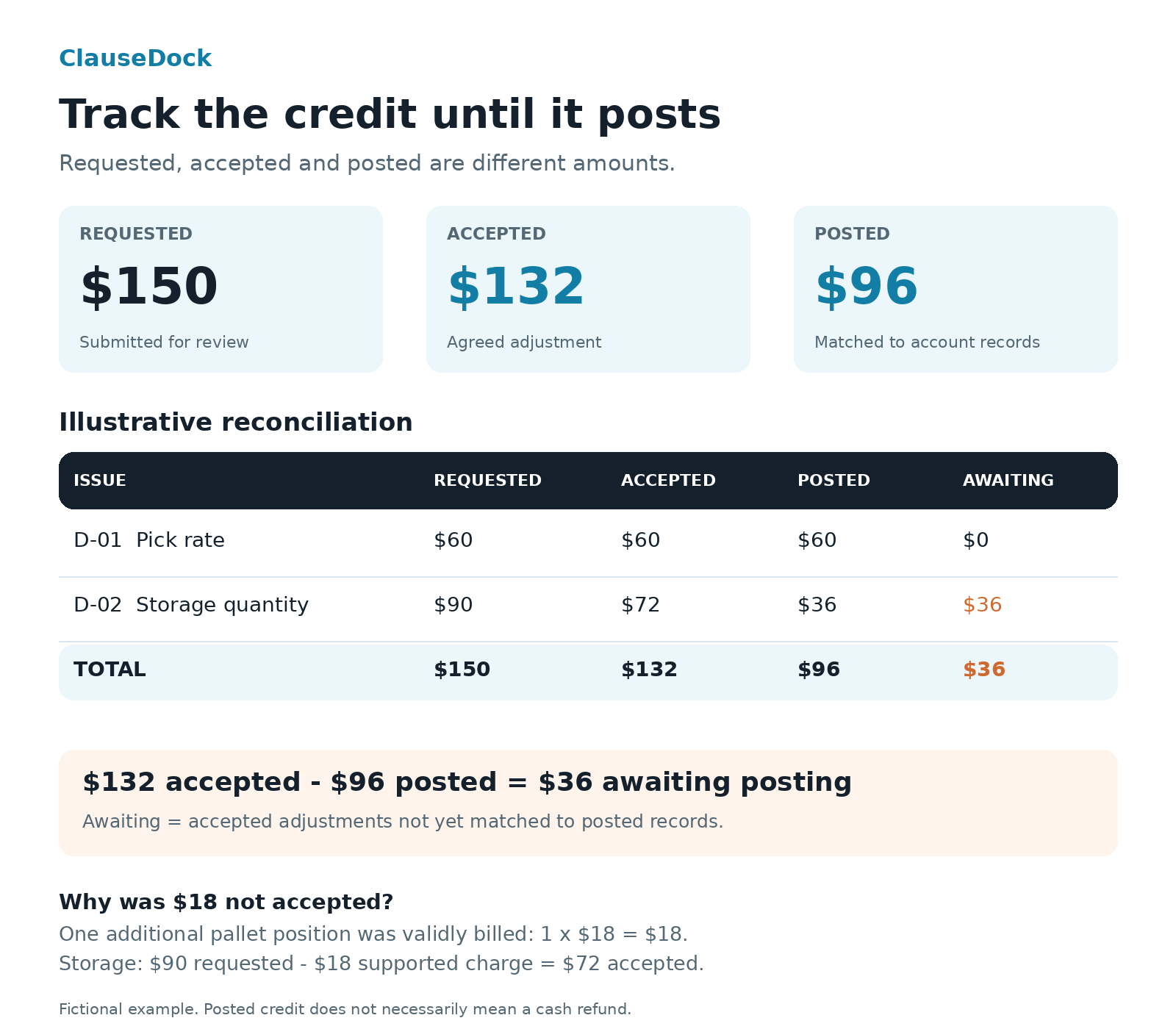
For D-02, the provider supplies a missing location record showing that one of the five questioned positions was validly billed under the agreement. The supported count therefore changes from 43 to 44 positions.
The corrected storage calculation becomes:
44 × $18.00 = $792.00
$864.00 billed − $792.00 expected = $72.00 accepted adjustment
The provider accepts $72.00 of the original $90.00 request.
| Issue | Requested | Accepted | Posted | Accepted Amount Awaiting Posting |
|---|---|---|---|---|
| D-01 | $60.00 | $60.00 | $60.00 | $0.00 |
| D-02 | $90.00 | $72.00 | $36.00 | $36.00 |
| Total | $150.00 | $132.00 | $96.00 | $36.00 |
The request total was $150.00. The accepted total is $132.00. Only $96.00 has posted.
Keep the provider’s explanation and supporting record for the $18.00 difference. Update the expected quantity and preserve the earlier calculation so the review history remains clear.
For D-02:
Accepted amount awaiting posting = $72.00 − $36.00 = $36.00
This assumes the $36.00 posting is correctly allocated to D-02 and no other adjustment applies.
Match credits using references, not amount alone. Two unrelated adjustments can have the same value.
Also distinguish the adjustment method:
| Method | What to Verify |
|---|---|
| Revised invoice | Replacement amount and treatment of the original invoice |
| Credit memo or account credit | Credit reference and application to the correct balance |
| Refund | Provider refund record and corresponding payment receipt |
Avoid counting a credit and the later refund of that same credit twice.
Copyable Follow-Up for an Accepted Adjustment
Subject: Posting confirmation — [case reference] — [invoice number]

Hello [billing team/contact],

Thank you for confirming an adjustment of [accepted amount and currency] for issue [ID] on invoice [invoice number].

As of [review date], we can match [posted amount] to [credit/transaction reference]. The remaining accepted amount awaiting posting is [amount].

Please confirm the adjustment reference and expected posting date for the remaining amount, or identify any record we have missed.

Our original case reference is [reference]. The acceptance confirmation is dated [date].

Thank you,
[Name]
If the provider rejects an issue, ask for the specific rule and source record supporting the decision. Update your calculation if that evidence changes the result.
For unresolved issues, use the escalation route in the agreement or billing procedure. Keep the evidence packet and correspondence together.
8. Prevent the Same Question Next Month
Once an issue is resolved, record what caused the difference.
Was it an outdated rate, an incorrect quantity, an ambiguous service description, overlapping exports, or a valid charge missing from your internal model?
Ask whether a confirmed correction requires an update to the billing configuration. Check the next invoice against the resolved rule.
Keep a reusable record containing:
- The affected fee family and references.
- The confirmed rule.
- The supporting calculation.
- The provider’s decision.
- The posted adjustment, if applicable.
- The next invoice check.
For recurring review, track accepted adjustments still awaiting posting. Keep that figure separate from requested amounts and cash refunds.
You can also track the number and age of open evidence questions. This helps your team prioritize source-record requests and follow-ups.
Pre-Submission Checklist
Frequently Asked Questions
What Evidence Do I Need for a 3PL Invoice Dispute?
Start with the billed line, the applicable pricing rule, the supporting activity, and a reproducible calculation. If one piece is missing, identify the gap and request the relevant record.
What if the Dispute Deadline Has Already Passed?
Check your agreement for the treatment of late notices and any available review procedure. You can ask the provider to review a documented error, but do not assume it must accept a late request. Obtain qualified advice if the amount is material or the consequences are unclear.
Can I Dispute an Invoice After Paying It?
Check your agreement and provider procedure. Payment status and dispute deadlines are separate matters; neither automatically establishes whether a later request will be accepted.
Should I Request a Credit or a Refund?
Ask which correction method applies to your account. A revised invoice, account credit, and cash refund require different reconciliation records. Track the actual outcome.
What if the Provider Says the Charge Is Correct?
Ask for the applicable rule, effective date, billable quantity, and supporting activity. Compare the explanation with your evidence and update the evidence status accordingly.
What Can ClauseDock Help With in a Dispute?
The free CSV checker finds repeated complete CSV rows, helping you investigate export overlap before raising a duplicate-charge question. It runs in your browser without uploading the file.
It does not interpret contracts, certify billing errors, or submit and track disputes.
Turn the Difference Into an Answerable Request
The practical approach to how to dispute a 3PL invoice is to connect each billed charge to its rule, activity, and calculation, then ask for a correction or the evidence supporting the charge.
Submit through the required channel. Separate supported discrepancies from missing evidence, and verify the final adjustment in the account.
Keep requested, accepted, and posted amounts distinct throughout the process.
For possible export overlap, open ClauseDock’s free CSV checker.
The ClauseDock self-service workspace is in release testing. Customer uploads and checkout are not open.
Customer file intake and payments are not open yet. Scope, availability, and price must be agreed before an order.
Sources and Further Reading
- ShipBob Terms of Service — Section 5.7: provider-specific notice and payment provisions. Check the terms applicable to your account.
- ShipBob Billing Documentation: examples of invoice and transaction records supporting reference matching.
- ClauseDock: How to Audit a 3PL Invoice: preparation and evidence checks.
- ClauseDock: Duplicate 3PL Charges: distinguishing export overlap from potentially duplicated services.
- ClauseDock: How to Calculate 3PL Storage Fees: storage methods and recalculation examples.
Guides in This Series
- How to Audit a 3PL Invoice: A Practical Checklist
- Duplicate 3PL Charges: How to Find and Verify Them
- How to Calculate 3PL Storage Fees and Check Your Invoice
- How to Dispute a 3PL Invoice With Clear Evidence
- 3PL Fulfillment Fees: How to Check Your Invoice
- 3PL Receiving Fees: How to Check Your Invoice